
Set Up a Ruby Dev Environment for PHLO
Using this guide, you can set up a development environment in five minutes to trigger a PHLO.
Install Ruby and Rails
To get started, install Ruby, Rails, and VTS’s Ruby SDK. You can check whether you have Ruby installed by running ruby --version in a terminal window. If you don’t have it, macOS and Linux users can install it using homebrew, and Windows users can use RubyInstaller.
To install Rails, run
gem install rails
Auto-generate code for a new Rails project with the command
rails new vtstest
This command creates a directory named vtstest with the necessary folders and files for development.
Install the VTS Ruby SDK
Add the VTS Ruby SDK by editing the Gemfile and adding the line
gem 'vts', '~> 4.16.0'
To install the vts-Ruby gem into the bundle, run
bundle install
Trigger the PHLO
Create and configure a PHLO, then integrate the PHLO into your application workflow by making an API request to trigger the PHLO with the required payload.
You can run a PHLO with static payload values by entering specific values in fields like from and to on the PHLO console.
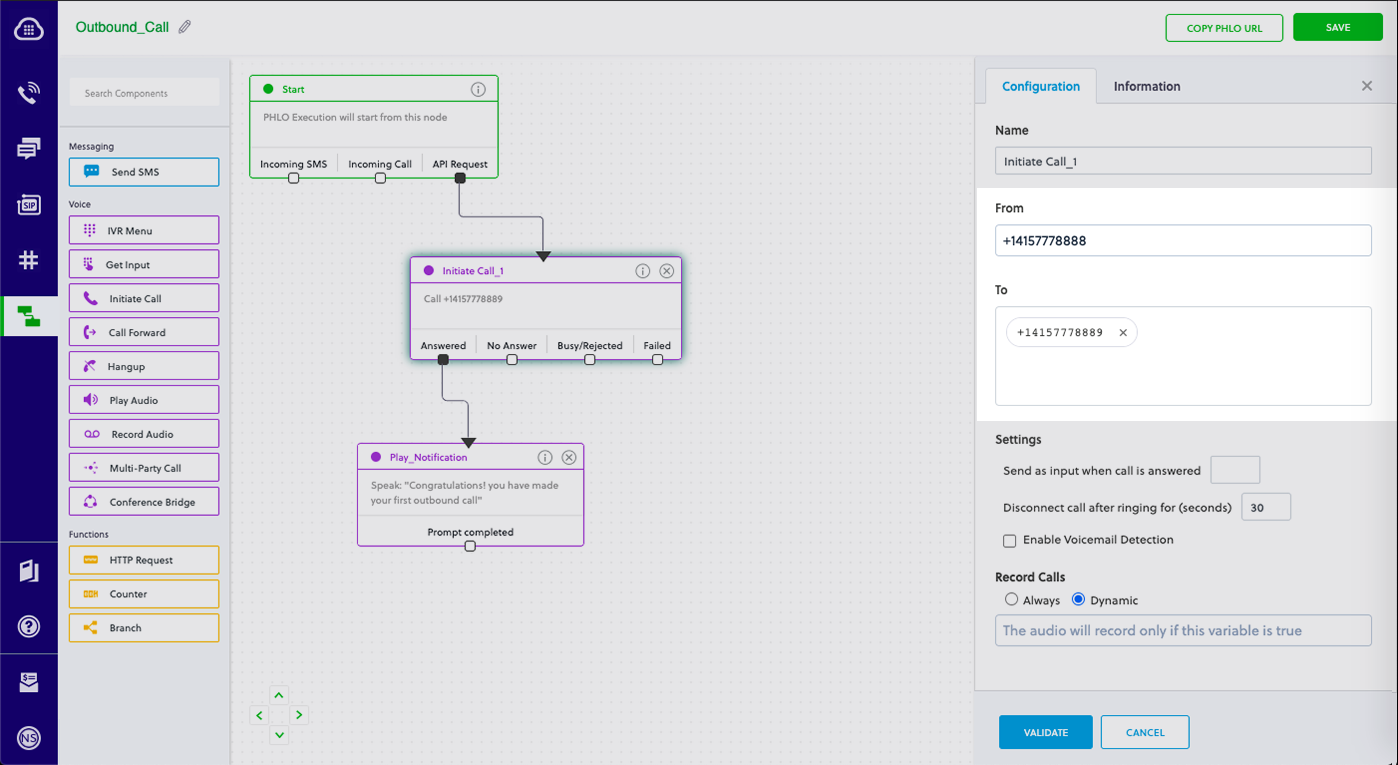
To deliver a dynamic payload instead of a static one, define the payload keys as Liquid templates on the PHLO console and pass the values at runtime.
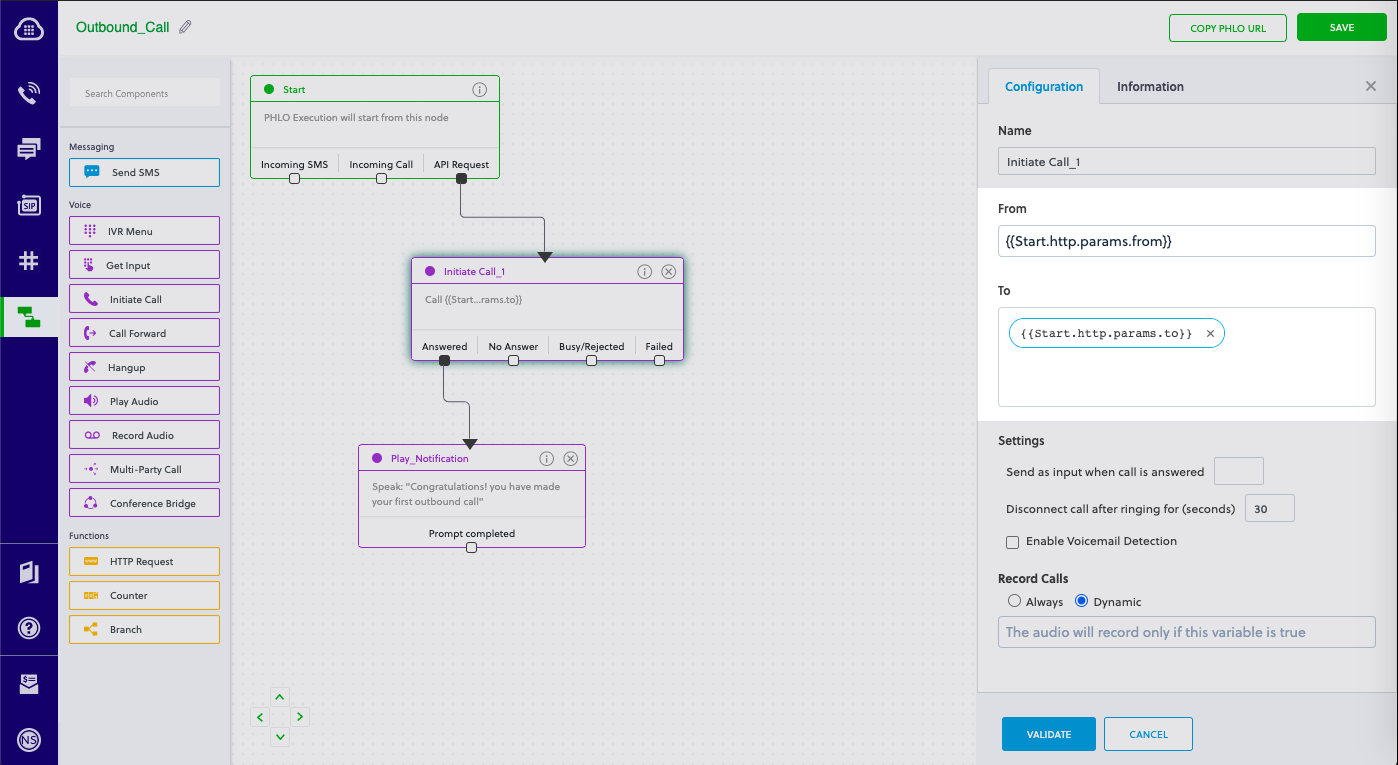
Create a Rails controller
Now you can create a file in the project directory and execute code to trigger any VTS API. Change to the newly created vtstest project directory and run this command to create a Rails controller for outbound calls.
rails generate controller VTS voice
This command generates a controller named vts_controller in the app/controllers/ directory and a view in app/views/vts. You can delete the view — we don’t need it.
rm app/views/vts/voice.html.erb
Edit the app/controllers/vts_controller.rb file and paste into it the code below for either a static or dynamic payload:
Static payload
1
2
3
4
5
6
7
8
9
10
11
12
13
14
15
16
17
18
19
20
21
22
23
24
25
26
27
28
require 'rubygems'
require 'vts'

include vts

AUTH_ID = '<auth_id>'
AUTH_TOKEN = '<auth_token>'

client = Phlo.new(AUTH_ID, AUTH_TOKEN)

# if credentials are stored in the VTS_AUTH_ID and the VTS_AUTH_TOKEN environment variables

# then initialize client as:

# client = Phlo.new

begin
  phlo = client.phlo.get('<phlo_id>')
  #parameters set in PHLO - params
  params = {
     from: '<Caller_ID>',
     to: '<Destination_Number>'
  }
  response = phlo.run(params)
  puts response
rescue VTSRESTError => e
  puts 'Exception: ' + e.message
end
Dynamic payload
1
2
3
4
5
6
7
8
9
10
11
12
13
14
15
16
17
18
19
20
21
22
23
require 'rubygems'
require 'vts'

include vts

AUTH_ID = '<auth_id>'
AUTH_TOKEN = '<auth_token>'

client = Phlo.new(AUTH_ID, AUTH_TOKEN)

# if credentials are stored in the VTS_AUTH_ID and the VTS_AUTH_TOKEN environment variables

# then initialize client as:

# client = Phlo.new

begin
  phlo = client.phlo.get('<phlo_id>')
  response = phlo.run()
  puts response
rescue VTSRESTError => e
  puts 'Exception: ' + e.message
end
- Replace the placeholders <auth_id> and <auth_token> with your authentication credentials, which you can find on the overview page of the VTS console.
- We recommend that you store your credentials in the auth_id and auth_token environment variables to avoid the possibility of accidentally committing them to source control. If you do this, you can initialize the client with no arguments and it will automatically fetch the values from the environment variables.
- Replace the placeholder <phlo_id> with the PHLO_ID from the PHLO list screen of the VTS console.
- Replace the placeholder <Caller_ID> with a phone number you’ve purchased, and <Destination_Number> with the phone number you’ll be calling. Both phone numbers should be in E.164 format.
Add a route
To add a route for the outbound function in the VTSController class, open the config/routes.rb file and change the line:
get 'vts/voice'
to
get 'vts/outbound'
Now vts_controller is ready. Use this command to initiate an outbound call.
rails server
Your local development server will be started and you can test the application for outbound calls via the URL http://localhost:3000/vts/outbound/.