Voice Teleservices Inc Browser SDK
Introduction
The Voice Teleservices Inc Browser SDK lets you make and receive calls using Voice Teleservices Inc applications directly from any web browser. Using our SDK, you can create applications such as:
- Call Center — Build efficient call center workflow by allowing your agents to make and receive calls via their browsers. Control call flow in your app using our API.
- Click to Call — When adding click to call for your CRM app, VTI runs seamlessly in the background to allow your users to interact via audio communication.
- Web-Based Help Desk — Create great service experiences and workflows. Sales and support agents can access customer info while making calls directly from their web browsers.
- Web Conferencing — Build rich conference experiences with VTI out-of-the-box features, including unique call flows, recording calls, and branded conference greetings.
How does it work?
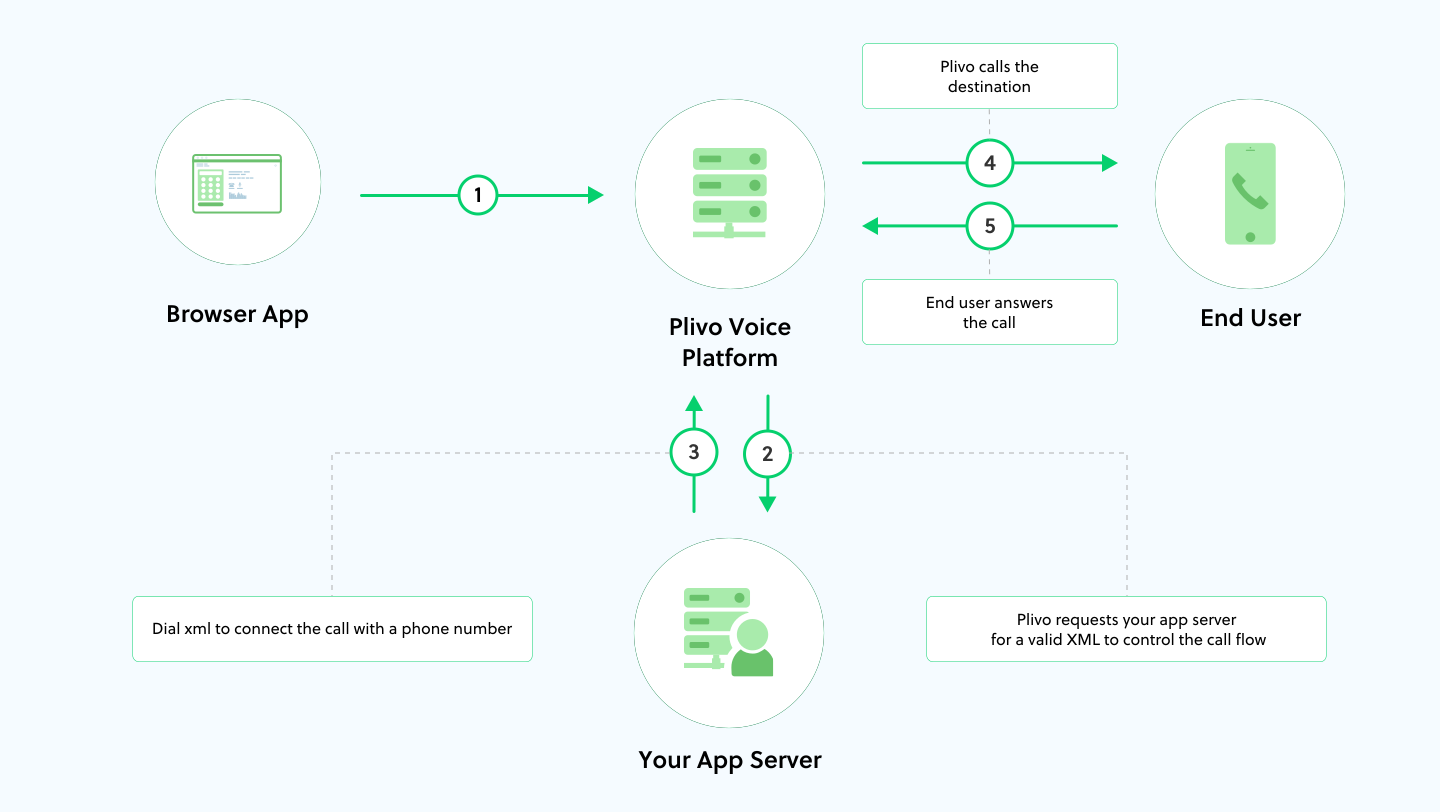
- From a browser, a VTS endpoint initiates an internet call to Voice Teleservices Inc voice platform.
- The platform notifies your application server about the call.
- Voice Teleservices handles the call based on XML documents returned by the application server. In this case, a Dial XML element connects the call with the phone number specified in the XML document.
- Voice Teleservices initiates a call to the phone number specified in the Dial XML element.
- Once the call is answered, the two parties are connected and can talk to each other.
To learn more about managing the call flows and types of call flows, refer to our Voice Overview guide.
Next steps
Now that you know the fundamentals, you can build a simple app. Get inspiration from our sample applications and learn implementation details from our Browser SDK Reference documentation.
Rate this page
🥳 Thank you! It means a lot to us!
×
Help Us Improve
Thank you so much for rating the page, we would like to get your input
for further improvements!
Subscribe to Updates
Thank you for your feedback!